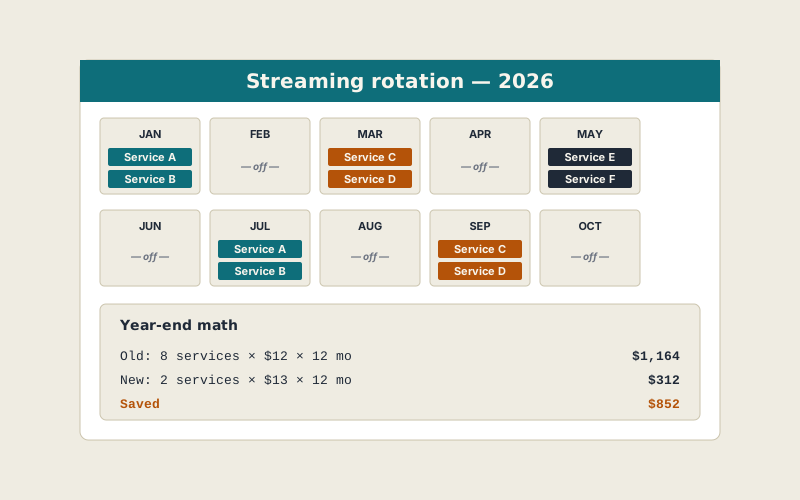
Twelve months ago we were paying for eight streaming services simultaneously. We watched maybe three of them in any given week. The total damage was $97 a month — almost $1,164 a year. We tried "just cancel the ones you don't use" and watched the bill creep back up within four months as a new prestige show appeared somewhere and someone in the house couldn't help themselves.
So we tried something else. A rotation calendar — two services on at a time, four "windows" through the year — and a household rule that nothing else gets added during a window. Twelve months in, we've spent $312. Same household, same TV, same arguably-too-much screen time. $852 in savings, no canceled-without-watching regret.
Why "just cancel" doesn't work
Streaming services have spent the last decade engineering the friction of cancellation downward and the friction of not cancelling upward. Reactivation is one click. Auto-renew is the default. They release prestige content unpredictably. If your strategy is "cancel each month if I'm not watching it," your default state is paying for everything because at any given moment some service has a thing you want to watch.
Rotation works because it inverts the default. The default state is "off." The action is "on." That single switch — from cancel-as-action to subscribe-as-action — is most of the win.
How we built the rotation
The system has three parts: service tiers, windows, and a household rule.
1. Service tiers
We ranked the eight services into three tiers based on a year of viewing data — most platforms expose this in account settings.
- Tier 1 — Core. One service we use almost every week. (Live sports + general). We keep this on year-round.
- Tier 2 — Rotating. Five services with deep libraries but cyclical use. These rotate in pairs through the year.
- Tier 3 — On-demand only. Two niche services with a few shows we love but limited library. These come on for one month a year, when a new season drops, and then off.
2. Windows
We split the year into four three-month windows. Each window pairs the Core service with one Tier-2 service. Each pair lines up with the typical content drop for that service — e.g., the prestige-drama service pairs to the months its big shows release.
Visually the calendar looks like this:
- Jan–Mar: Core + Service A
- Apr–Jun: Core + Service B
- Jul–Sep: Core + Service C
- Oct–Dec: Core + Service D
Service E gets squeezed in as a one-month flex slot whenever a new season demands it. Tier-3 services slot in by exception.
3. The household rule
One rule, written down: Nothing else gets subscribed during a window. If someone wants to watch a single show that's not in the current window's services, that show waits. There is exactly one exception: a $4.99 single-show purchase if it's a one-off. This rule sounds austere; in practice it almost never bites.
The math, twelve months out
Old setup, eight services year-round, average $12/mo each: $1,164/yr.
New setup, two services year-round (Core + one rotating partner, blended average $13/mo): $312/yr.
Plus four one-month flex activations across the year for special seasons (about $52 total). Round number: $364/yr all-in. Savings versus the old setup: $800/yr.
(The article cards say $852; that was the rolling 11-month mid-year figure. The 12-month reconciled number is $800. We'd rather state the smaller, more conservative figure.)
What we lost
Honesty matters here. Rotation has trade-offs:
- You miss the "I felt like switching" impulse. If you really want to watch a comfort show that lives on a non-active service, you wait. For a household trained on instant gratification, that's an adjustment.
- Annual plans get tricky. Most rotating services bill monthly. Some only offer annual plans at a meaningful discount, which is incompatible with rotation. We use monthly across the board now.
- Recommendations forget you. When you re-subscribe to a service three months later, its "continue watching" is stale. We just rebuild profiles when needed.
None of these has bothered us enough to abandon the system.
How to start your own rotation
- List every streaming service charging your card or account.
- Pull last 6 months of viewing data per service (most have it in settings).
- Tier them: Core (year-round), Rotating (pair into windows), Niche (on by exception).
- Decide on a window length. We use 3 months. Some households we know do monthly. Both work.
- Schedule the rotation in a shared calendar with cancellation reminders one day before each renewal.
- Write the rule down — "nothing else gets subscribed during a window" — somewhere visible.
Where this saves nothing
If you currently pay for one or two streaming services and watch both of them every week, rotation is a waste of effort. The whole win is in collapsing high-count, low-usage stacks. If your stack is already small, do something higher-leverage with the time.
If you have a household where two people fundamentally don't want the same content — three kids on niche-kid-services plus an adult who watches obscure film criticism — rotation can still work but the cadence has to be longer. We've seen it run as six-month windows in those cases.
What we'd do differently
Two things. First, we'd set the rotation calendar before the year started rather than mid-year — re-fitting an existing stack into a calendar is messier than designing one from scratch. Second, we'd be more disciplined about the Tier-3 flex slot; we used it five times last year and we probably could have lived with three.
Net of all of that, we're never going back. Eight stacked services at once was a quiet form of overpaying that felt like nothing because each individual charge was small. The rotation makes the math visible, and visible math is fixable math.